

Hashing Kya Hai? | Hashing in Cyber Security | MD5, SHA-256 & John the Ripper
Hashing cybersecurity और Linux security में एक बहुत important concept है। अगर आप Cyber Security, Ethical Hacking, Penetration Testing या Linux Security सीख रहे हैं, तो आपको hashing को अच्छी तरह समझना चाहिए।
- Hashing क्या है और Hash क्या होता है?
- Hashing को One-Way Function क्यों कहा जाता है?
- Passwords store करने और Integrity Checking में Hashing का रोल।
- MD5 और SHA-1 weak क्यों माने जाते हैं?
- SHA-256 vs Dedicated Password Algorithms (Argon2id, bcrypt)।
- Hash Cracking, John the Ripper, Hash-Identifier और Haiti tools।
- Hashing vs Encryption में फर्क।
1. Hashing Kya Hai?
Hashing एक process है जिसमें किसी भी input data को एक fixed-format hash value में convert किया जाता है।
Input कुछ भी हो सकता है: Password, Text, File, Message या Data।
उदाहरण:
- Input:
mypassword123 - MD5 Hash:
9c87baa223f464954940f859bcf2e233
यह output एक hash value है। इसे आप data का एक तरह का Digital Fingerprint समझ सकते हैं।
Simple Example & Integrity:
मान लीजिए हमारे पास यह text है: Hello World
जब इसे किसी hashing algorithm से process किया जाता है, तो हमें एक hash value मिलती है। अगर input में थोड़ा सा भी बदलाव कर दें (जैसे Hello world), तो hash पूरी तरह बदल जाएगा। यही property इसे Data Integrity Checking में बेहद काम की बनाती है।
2. Hash Kya Hota Hai?
Hashing process से मिलने वाले final output को Hash कहा जाता है।
Hash की length इस्तेमाल किए गए algorithm पर depend करती है:
| Algorithm | Typical Hash Length |
|---|---|
| MD5 | 128 bits |
| SHA-1 | 160 bits |
| SHA-256 | 256 bits |
| SHA-512 | 512 bits |
3. Hashing ko One-Way Function kyu Kaha Jata Hai?
Hashing को mathematically one-way function माना जाता है क्योंकि hash value से original input को सीधे reverse करने का कोई practical तरीका नहीं होता।
Hash Value ───X (Cannot Reverse Direct) ───► mypassword123
लेकिन इसका यह मतलब नहीं है कि password कभी पता नहीं लगाया जा सकता! अगर password weak या common है (जैसे 123456, password, admin), तो attacker pre-computed hashes या password guessing से original value मैच कर सकता है।
4. Hashing kyu Important Hai?
Cyber Security में Hashing के 2 सबसे प्रमुख उपयोग हैं:
A. Secure Password Storage
Websites कभी भी users के passwords plain text में store नहीं करतीं। अगर database leak हो जाए और passwords plain text में हों, तो attacker आसानी से accounts compromise कर लेगा।
इसलिए system password को hash करके database में रखता है और login के समय entered password का hash बनाकर verify करता है:
YES ──► Login Success | NO ──► Reject
B. File Integrity Checking
जब आप internet से कोई file या ISO download करते हैं, तो original supplier उसकी hash value provide करता है। File download होने के बाद आप उसका hash चेक करके यह confirm कर सकते हैं कि file में कोई corruption या malware tampering नहीं हुई है।
5. MD5 aur SHA-1 Weak kyu Mane Jate Hain?
MD5 और SHA-1 historically बहुत popular रहे हैं, लेकिन आज security-sensitive systems के लिए इन्हें outdated माना जाता है।
इनमें Collision Attacks practical पाए गए हैं।
जब दो अलग-अलग Inputs (Input A और Input B) का hashing के बाद **Same Hash Output** आ जाए, तो उसे Collision कहा जाता है।
साथ ही, MD5 और SHA-1 बहुत तेज (fast) काम करते हैं, जिससे attackers per second अरबों hashes test करके cracking को आसान बना लेते हैं।
6. Kya SHA-256 Passwords ke Liye Best Hai?
SHA-256 integrity checking के लिए बेहतरीन है, लेकिन सिर्फ SHA-256(password) का उपयोग करना modern security standard नहीं है।
चूंकि SHA-256 की speed भी बहुत फास्ट है, इसलिए attackers GPU/Hardware की मदद से बहुत तेजी से brute force guessing कर सकते हैं।
Modern Password Storage Best Choice:
Argon2idbcryptscrypt
इन dedicated algorithms को intentionally धीमा (computationally expensive) बनाया जाता है ताकि attackers तेजी से guesses न कर सकें।
7. Hash Cracking, Tools & Techniques
Hash Cracking का मतलब hash को decrypt करना नहीं, बल्कि अलग-अलग passwords के hashes बनाकर target hash से match करना है।
Methods:
- Brute Force: All possible letter/number combinations को try करना (जैसे 0001, 0002…)।
- Wordlist Attack: Pre-defined common passwords list (जैसे
rockyou.txt) के hashes बनाकर compare करना।
John the Ripper:
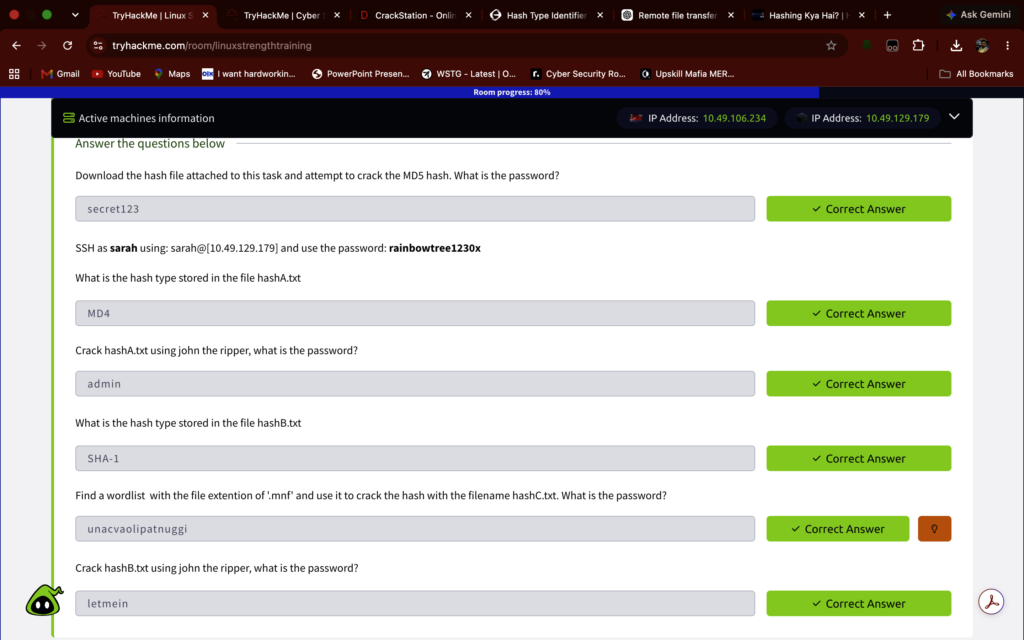
John the Ripper एक प्रसिद्ध Password Security Auditing और Recovery Tool है जो Kali Linux में pre-installed आता है।
john --format=raw-md5 --wordlist=/path/to/rockyou.txt hash.txt
Hash Identification Tools (Hash-Identifier & Haiti):
जब आपको कोई अज्ञात hash मिलता है, तो उसके algorithm को पहचानना जरूरी होता है:
- Hash-Identifier: Command-line tool जो possible algorithm types लिस्ट करता है।
- Haiti: एक modern CLI tool जो अज्ञात hashes को detect और narrow-down करने में मदद करता है।
8. Hashing vs Encryption
| Property | Hashing | Encryption |
|---|---|---|
| Type | Generally One-Way | Two-Way (Encrypt & Decrypt) |
| Reversibility | Original data direct decrypt नहीं होता | Key की मदद से data decrypt हो सकता है |
| Main Purpose | Integrity & Verification | Confidentiality & Data Protection |
| Example | SHA-256, Argon2id | AES, RSA |
Hashing ──► Verify (जांच करना)
Encryption ──► Protect & Recover (सुरक्षित रखना और वापस पाना)
Conclusion
Hashing Cyber Security का एक fundamental pillar है। Linux password management, file integrity validation, penetration testing और forensic analysis में इसका ज्ञान बेहद आवश्यक है।
एक Ethical Hacker या Security Researcher के तौर पर आपको सिर्फ hashing की परिभाषा ही नहीं, बल्कि fast vs slow hashing algorithms, collision threats और cracking tools की बारीकियों को समझना चाहिए।
© Cyber-Teck | Ethical Hacking & Cybersecurity Knowledge Base