AWK Kya Hai? (Complete Beginner Guide)
AWK Linux/Unix ka ek powerful text processing aur pattern scanning tool hai. Iska use text files ko search, filter, format, analyze aur report generate karne ke liye kiya jata hai. Command line par bade logs aur files ko parse karne ke liye ye sabse zyada pasand kiya jaane wala tool hai.
AWK ka naam iske original creators ke surname se lekar rakha gaya hai:
- A – Alfred Aho
- W – Peter Weinberger
- K – Brian Kernighan
AWK Ka Basic Syntax
AWK ko use karne ke do mukhya tarike hain:
awk 'pattern { action }' filenameYa phir bina kisi pattern ke sirf action chalane ke liye:
awk '{ action }' filename- Pattern: Yeh nirdeshit karta hai ki kis specific line ya condition par action perform karna hai.
- Action: Yeh batata hai ki select ki gayi lines ke sath kya task execute karna hai (jaise print karna).
Example File Setup
Maan lijiye hamare paas ek demo text file hai jiska naam employees.txt hai:
Ali HR 6000
Sara IT 8000
Ahmed Finance 7500
AWK Practical Examples
Example 1: Puri File Print Karna
Bina kisi rules ke poori file ko output me dekhne ke liye print ka use karein:
awk '{print}' employees.txtAli HR 6000
Sara IT 8000
Ahmed Finance 7500
Example 2: First Column Print Karna
AWK har line ko automatically spaces ke basis par parse karta hai. Pehla column nikalne ke liye $1 use karein:
awk '{print $1}' employees.txtAli
Sara
Ahmed
Note: $1 yani Pehla column, $2 Yani Doosra column, aur isi tarah aage kaam karta hai.
Example 3: Multiple Columns Print Karna
Do ya do se zyada columns ko ek sath comma lagakar print kiya ja sakta hai:
awk '{print $1,$3}' employees.txtAli 6000
Sara 8000
Ahmed 7500
Example 4: Line Number (Row Number) Print Karna
NR ek internal variable hai jo line number handle karta hai, aur $0 poori line ke data ko specify karta hai:
awk '{print NR,$0}' employees.txt2 Ali HR 6000
3 Sara IT 8000
4 Ahmed Finance 7500
Important Built-in Variables Table
AWK me pehle se bani hui commands hoti hain jo hamara kaam aasan karti hain:
| Variable | Description / Meaning |
|---|---|
$0 |
Complete line (Poori line ek sath) |
$1, $2, $3 |
Specific field / Column number |
NR |
Current line number (Number of Records) |
NF |
Number of fields (Ek line me total kitne columns hain) |
FS |
Input Field Separator (By default space hota hai) |
OFS |
Output Field Separator |
Example 5: Sirf IT Department Ka Data Filter Karna
Kisi string specific search ke liye string comparison lagaya jata hai:
awk '$2=="IT"' employees.txtExample 6: Greater Than Condition (Salary > 6000)
Aap mathematical conditions bhi laga sakte hain:
awk '$3 > 6000' employees.txtAhmed Finance 7500
Example 7: Field Separator Badanna (CSV Files Ke Liye)
Agar file comma-separated values (CSV) format me hai, to use process karne ke liye -F filter use kiya jata hai:
Ali,HR,6000
Sara,IT,8000
awk -F "," '{print $1,$2}' employees.csvAli HR
Sara IT
Calculations Aur Reports Generator
Example 8: Total Salary Calculate Karna
AWK variables bana kar operations kar sakta hai. END block file ke bilkul aakhir me chalta hai:
awk '{sum += $3} END {print sum}' employees.txtExample 9: Average Salary Nikalna
awk '{sum += $3} END {print sum/NR}' employees.txtExample 10: BEGIN aur END Blocks Ka Use
awk '
BEGIN {print "Employee Report"}
{print $1,$3}
END {print "Report Finished"}
' employees.txtJohn 5000
Ali 6000
Sara 8000
Ahmed 7500
Report Finished
AWK vs GREP vs SED
| Tool | Main Core Use Case |
|---|---|
| grep | Simple text ya string patterns ko search karna. |
| sed | Text ko stream me modify, edit, delete ya substitute karna. |
| awk | Complex calculations, data structuring, aur full reports banana. |
Cyber Security Aur Log Analysis Mein AWK Ka Use
Users ki list extract karna:
cat /etc/passwd | awk -F ":" '{print $1}'System me chal rahe listening ports dekhna:
ss -tuln | awk '{print $5}'Auth Logs me se Failed logins trace karna:
awk '/Failed/ {print}' auth.logAccess Logs se Target IP addresses filter out karna:
awk '{print $1}' access.logConclusion
AWK Linux ecosystem ka ek behad shaandar aur tezi se kaam karne wala tool hai. Agar aap Linux Administration, DevOps, Ethical Hacking ya Security Analytics ka career target kar rahe hain, to AWK script patterns ko samajhna aapke kaam ko bohot zyada efficient bana dega.
Note -Linux me “parse” ka matlab hota hai:
Data ya text ko padhkar uske structure ko samajhna aur usme se zaroori information nikalna.
TryHackme lab (Linux modules)
AWK Linux का एक बेहद शक्तिशाली टेक्स्ट प्रोसेसिंग टूल है। इसका उपयोग फाइलों से डेटा निकालने, फ़िल्टर करने, रिपोर्ट बनाने और टेक्स्ट को मनचाहे फॉर्मेट में बदलने के लिए किया जाता है।
इस लेख में हम TryHackMe के एक वास्तविक उदाहरण की मदद से AWK के BEGIN, FS, OFS, $1, $2 आदि को समझेंगे।
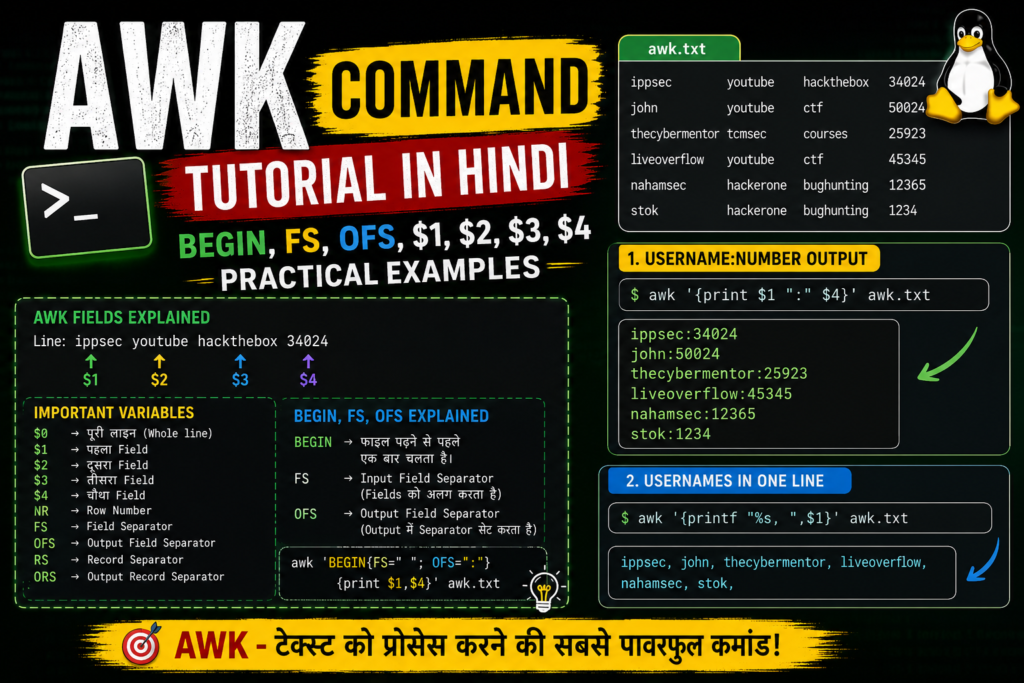
हमारी Input File (awk.txt)
मान लीजिए awk.txt में निम्नलिखित डेटा है:
ippsec youtube hackthebox 34024
john youtube ctf 50024
thecybermentor tcmsec courses 25923
liveoverflow youtube ctf 45345
nahamsec hackerone bughunting 12365
stok hackerone bughunting 1234
यहाँ प्रत्येक लाइन में कई Fields (कॉलम) हैं और वे Space द्वारा अलग किए गए हैं।
AWK में Fields कैसे काम करते हैं?
AWK हर लाइन को अलग-अलग Fields में विभाजित करता है।
उदाहरण:
ippsec youtube hackthebox 34024
AWK इसे इस प्रकार देखता है:
$1 = ippsec
$2 = youtube
$3 = hackthebox
$4 = 34024
इसी तरह दूसरी लाइन:
john youtube ctf 50024
AWK के लिए:
$1 = john
$2 = youtube
$3 = ctf
$4 = 50024
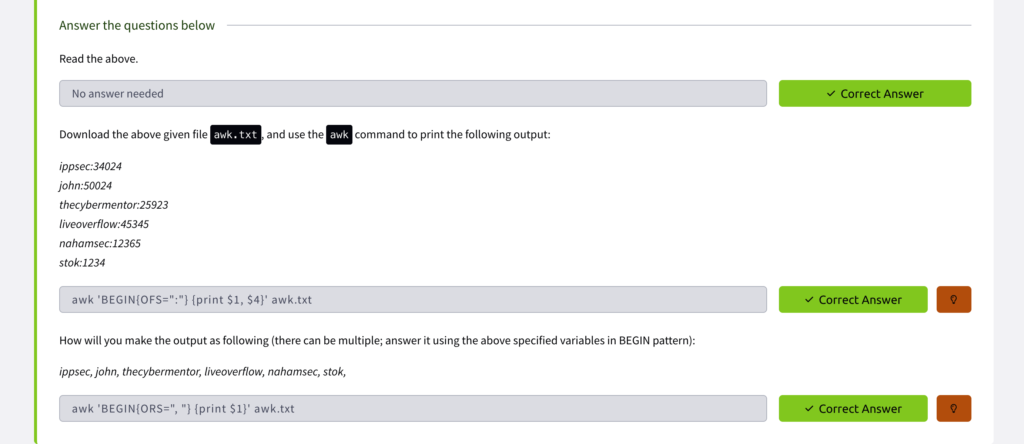
प्रश्न 1
हमें यह आउटपुट प्राप्त करना है:
ippsec:34024
john:50024
thecybermentor:25923
liveoverflow:45345
nahamsec:12365
stok:1234
AWK Command
awk ‘{print $1 “:” $4}’ awk.txt
कैसे काम करता है?
- $1 → Username
- $4 → Last Number
- “:” → दोनों के बीच Colon जोड़ता है
AWK प्रत्येक लाइन पढ़ता है और पहले तथा चौथे Field को : के साथ प्रिंट करता है।
Step-by-Step Example
पहली लाइन:
ippsec youtube hackthebox 34024
AWK देखता है:
$1 = ippsec
$4 = 34024
और प्रिंट करता है:
ippsec:34024
BEGIN क्या है?
BEGIN एक विशेष ब्लॉक है जो फाइल पढ़ने से पहले केवल एक बार चलता है।
उदाहरण:
awk ‘BEGIN{print “Processing Started”} {print $1}’ awk.txt
Output:
Processing Started
ippsec
john
thecybermentor
liveoverflow
nahamsec
stok
FS (Field Separator) क्या है?
FS का मतलब है Field Separator।
डिफ़ॉल्ट रूप से AWK Space या Tab को Separator मानता है।
इसलिए हमारी फाइल में:
ippsec youtube hackthebox 34024
AWK अपने आप Fields को पहचान लेता है।
लेकिन यदि डेटा comma से अलग होता:
ippsec,34024
john,50024
तो हमें बताना पड़ता:
awk ‘BEGIN{FS=”,”} {print $1 “:” $2}’ awk.txt
यहाँ:
BEGIN{FS=”,”}
का अर्थ है:
फाइल पढ़ने से पहले AWK को बताओ कि Fields comma से अलग हैं।
प्रश्न 2
अब हमें केवल usernames को एक लाइन में इस प्रकार प्रिंट करना है:
ippsec, john, thecybermentor, liveoverflow, nahamsec, stok,
AWK Command
awk ‘{printf “%s, “,$1}’ awk.txt
Explanation
- printf नई लाइन नहीं जोड़ता।
- %s String को प्रिंट करता है।
- $1 पहला Field है।
Output:
ippsec, john, thecybermentor, liveoverflow, nahamsec, stok,
OFS (Output Field Separator) क्या है?
OFS का मतलब है:
Output Field Separator
उदाहरण:
awk ‘BEGIN{OFS=”:”} {print $1,$4}’ awk.txt
Output:
ippsec:34024
john:50024
thecybermentor:25923
liveoverflow:45345
nahamsec:12365
stok:1234
यहाँ AWK ने $1 और $4 के बीच OFS (:) जोड़ दिया।
उपयोगी AWK Variables
| Variable | Meaning |
| $0 | पूरी लाइन |
| $1 | पहला Field |
| $2 | दूसरा Field |
| $3 | तीसरा Field |
| $4 | चौथा Field |
| NR | Current Record Number |
| FS | Field Separator |
| OFS | Output Field Separator |
| RS | Record Separator |
| ORS | Output Record Separator |
निष्कर्ष
इस उदाहरण से हमने सीखा:
- AWK Space से Fields को स्वतः पहचानता है।
- $1, $2, $3, $4 का उपयोग कॉलम एक्सेस करने के लिए किया जाता है।
- BEGIN फाइल पढ़ने से पहले चलता है।
- FS Input Field Separator सेट करता है।
- OFS Output Field Separator सेट करता है।
- print और printf का उपयोग अलग-अलग प्रकार के आउटपुट के लिए किया जाता है।
AWK Linux सिस्टम एडमिनिस्ट्रेशन, साइबर सिक्योरिटी, लॉग एनालिसिस और डेटा प्रोसेसिंग में सबसे अधिक उपयोग किए जाने वाले टूल्स में से एक है।