
Python Crash Course Series

Python में Lists सीखने के बाद अगला सबसे important concept आता है — Working with Lists।
इस chapter में हम सीखेंगे:
- List पर loop कैसे चलाते हैं
- for loop क्या होता है
- Indentation क्यों जरूरी है
- Multiple operations कैसे करते हैं
- Common errors कैसे fix करें
1. Looping Through an Entire List
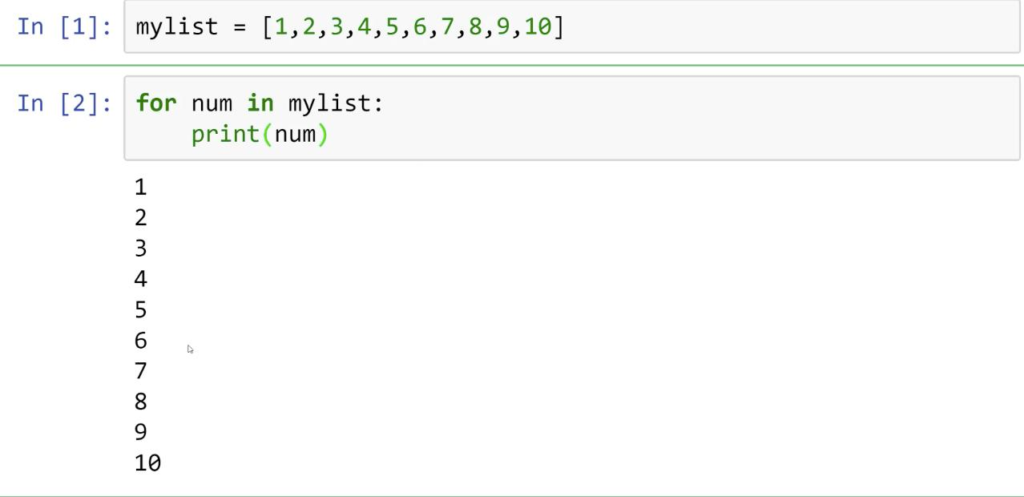
जब हमें list के हर item पर same task करना हो, तब हम for loop का use करते हैं।
Example
magicians = [‘alice’, ‘david’, ‘carolina’]
for magician in magicians:
print(magician)
Output
alice
david
carolina
यह Code कैसे काम कर रहा है?
Step-by-Step समझिए
Step 1
magicians = [‘alice’, ‘david’, ‘carolina’]
यह एक list है जिसमें 3 names store हैं।
Step 2
for magician in magicians:
यह line Python को बोलती है:
“List के हर item को एक-एक करके magician variable में store करो।”
Step 3
print(magician)
हर बार current item print होगा।
For Loop का Flow
1st Loop → alice
2nd Loop → david
3rd Loop → carolina
Real Life Example
मान लीजिए आपके पास students की list है:
students = [“sajid”,”intsar”,”deepak”]
for student in students:
print(student)
Output
sajid
intsar
deepak
2. Doing More Work Inside a Loop
हम सिर्फ print ही नहीं, बल्कि हर item पर extra work भी कर सकते हैं।
Example
magicians = [‘alice’, ‘david’, ‘carolina’]
for magician in magicians:
print(f”{magician.title()}, that was a great trick!”)
Output
Alice, that was a great trick!
David, that was a great trick!
Carolina, that was a great trick!
.title() क्या करता है?
.title() first letter को capital बनाता है।
Example
name = “sajid”
print(name.title())
Output
Sajid
3. Multiple Lines Inside Loop
Loop के अंदर multiple lines भी लिख सकते हैं।
Example
magicians = [‘alice’, ‘david’, ‘carolina’]
for magician in magicians:
print(f”{magician.title()}, that was a great trick!”)
print(f”I can’t wait to see your next trick, {magician.title()}.\n”)
Output
Alice, that was a great trick!
I can’t wait to see your next trick, Alice.
David, that was a great trick!
I can’t wait to see your next trick, David.
Carolina, that was a great trick!
I can’t wait to see your next trick, Carolina.
\n क्या है?
\n एक newline character है।
यह next line में space देता है।
4. Doing Something After a Loop
अगर आप loop खत्म होने के बाद कोई message दिखाना चाहते हैं:
Example
magicians = [‘alice’, ‘david’, ‘carolina’]
for magician in magicians:
print(f”{magician.title()}, that was a great trick!”)
print(“Thank you everyone!”)
Output
Alice, that was a great trick!
David, that was a great trick!
Carolina, that was a great trick!
Thank you everyone!
Important Concept
Indented Line
print()
यह loop के अंदर है।
Non-Indented Line
print()
यह loop के बाहर है।
5. Understanding Indentation
Python indentation पर बहुत depend करता है।
गलत indentation error देता है।
Wrong Example
magicians = [‘alice’, ‘david’, ‘carolina’]
for magician in magicians:
print(magician)
Error
IndentationError: expected an indented block
Correct Example
magicians = [‘alice’, ‘david’, ‘carolina’]
for magician in magicians:
print(magician)
Why Indentation Important?
Python indentation से समझता है:
- कौन सा code loop के अंदर है
- कौन सा code function के अंदर है
- कौन सा code बाहर है
6. Common Mistake – Forgetting Extra Indentation
Wrong Code
magicians = [‘alice’, ‘david’, ‘carolina’]
for magician in magicians:
print(f”{magician.title()}, great trick!”)
print(f”I can’t wait to see your next trick, {magician.title()}”)
Problem
Second line loop के बाहर चली गई।
इसलिए यह सिर्फ last value पर चलेगी।
Correct Code
magicians = [‘alice’, ‘david’, ‘carolina’]
for magician in magicians:
print(f”{magician.title()}, great trick!”)
print(f”I can’t wait to see your next trick, {magician.title()}”)
7. Practical Example – YouTube Subscribers
subscribers = [‘Aman’, ‘Sajid’, ‘Rohan’]
for subscriber in subscribers:
print(f”Welcome to Cyber-Teck, {subscriber}!”)
Output
Welcome to Cyber-Teck, Aman!
Welcome to Cyber-Teck, Sajid!
Welcome to Cyber-Teck, Rohan!
8. Practical Example – Online Store
products = [‘Mouse’, ‘Keyboard’, ‘Monitor’]
for product in products:
print(f”{product} is available”)
Output
Mouse is available
Keyboard is available
Monitor is available
Key Points to Remember
✅ for loop list के हर item पर चलता है
✅ Indentation बहुत जरूरी है
✅ Multiple lines loop के अंदर लिख सकते हैं
✅ Loop खत्म होने के बाद अलग code चला सकते हैं
✅ Python readability indentation से improve होती है
Final Words
Working with Lists Python programming का बहुत powerful concept है।
यह concept आगे:
- Automation
- Data Science
- Hacking Scripts
- Web Development
- AI Projects
हर जगह use होगा।
अगर आपको loops अच्छे से समझ आ गए, तो Python coding काफी आसान लगने लगेगी।
Practice Task
Task 1
friends = [‘Ali’, ‘Sajid’, ‘Rahman’]
Loop लगाकर सभी names print करें।
Task 2
हर friend के लिए welcome message print करें।
Task 3
Loop खत्म होने के बाद:
Thank you for visiting!
print करें।